
Server-to-Server (S2S) Reward Postback
Functional Overview
The Carty Developer Platform provides the Server-to-Server (S2S) Reward Postback feature, designed to enhance the security of reward distribution for rewarded video ads.
By enabling this feature, the reward issuance logic is upgraded from a simple "client-side callback" to "server-side validation." The Carty server pushes a fulfillment notification directly to the developer's server. This effectively prevents fraudulent activities, such as "reward mining" through manipulated client-side data, ensuring the fairness of the incentive system and the integrity of business data.
Workflow
Enable S2S Postback
Developers must enable
Server-to-Server Reward Postbackfor specific rewarded video ad placements in the Carty Dashboard and configure a valid endpoint URL.Example Callback URL:
https://www.dev.com/reward/callback
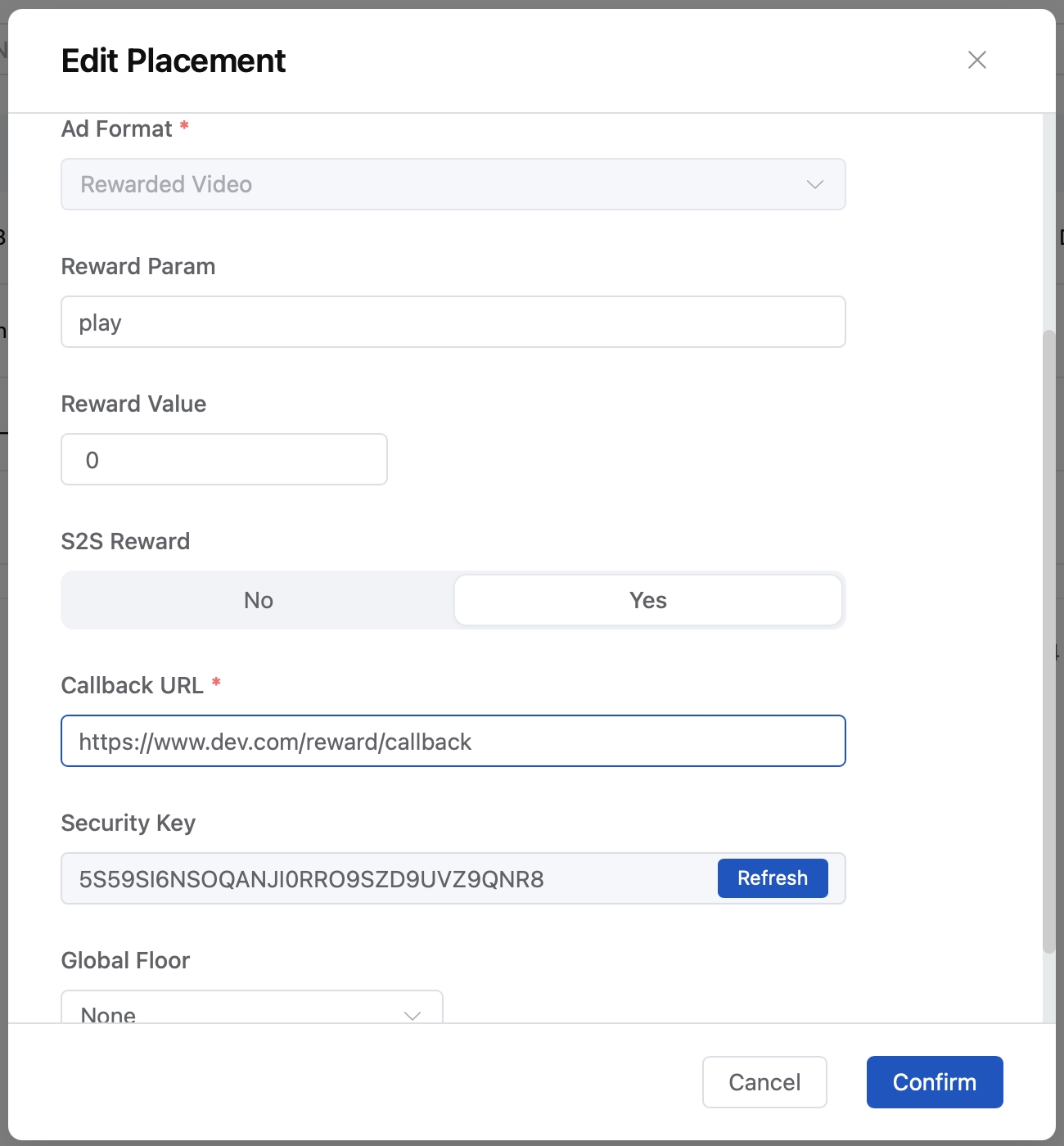
Parameter Passing
- When a user starts watching a rewarded video, the developer must pass a unique user identifier (user_id) and optional custom business parameters (extra) through the SDK.
Server Notification
- Upon successful completion of the video, the Carty server sends an HTTP GET request to the developer's configured URL.
Validation & Fulfillment
- The developer's server receives the request, validates the signature (
sign), and checks the transaction uniqueness (trans_id). After successful verification, the reward is issued on the business layer, and a response is returned in the specified format.
Callback Protocol Specification
Request Definition
Method: HTTP GET
Character Encoding: UTF-8
Field Definitions :
| Parameter | Type | Definition | Description |
|---|---|---|---|
user_id | String | User ID | The unique business user ID passed via the client SDK. |
trans_id | String | Transaction ID | A unique identifier generated by Carty for each specific view. |
rewarded_name | String | Reward Name | The name of the reward configured in the dashboard. |
rewarded_value | Int | Reward Amount | The quantity of the reward configured in the dashboard. |
placement_uid | String | Placement ID | The unique ID of the ad placement assigned by Carty. |
sign | String | Security Signature | Used to verify the authenticity of the request. |
extra | String | Custom Parameters | Pass-through fields provided by the developer during the SDK call (ensure URL encoding). |
- Request Example:
https://www.dev.com/reward/callback?extra=%7B%22name%22%3A%22user1%22%7D&placement_uid=p201156097019213&rewarded_name=play&rewarded_value=10&sign=0861c6e4e4a83c15a5bcbb028bb1f0a369acf9257156226f12da4315a1579831&trans_id=cf9257156226&user_id=a5bcbb0Security & Authentication
To ensure the callback request originates from Carty and has not been tampered with, developers should verify the sign field.
Rule: Concatenate the
security_keyandtrans_idusing a colon (:) and perform a SHA-256 hash calculation.Formula:
sign = sha256("security_key:trans_id")。Credentials: The
security_keycan be retrieved from the Ad Placement details page on the Carty Dashboard.Signature Example:
security_key: E5F9F080B1F534C8992C6D81EBBD3E89
trans_id: f2ee29c410b86bf6b

Calculation Result (Sign): e9957ec57285c4e3736da2c5ed09ff328883184c12b5ac4a53a63758b4fdfb6c
Response Specification
After processing the callback, the developer's server must return a JSON response to confirm successful receipt.
| Parameter | Type | Definition | Description |
|---|---|---|---|
is_verify | Boolean | Verification Result | The result of the developer's server-side validation. |
code | Int | Status Code | 0 for success; non-zero for business error codes. |
msg | String | Message | Brief description of the processing result or error reason. |
- Response Example:
{
    "is_verify": true,
    "code": 0,
    "msg": "success"
}
Retry Mechanism
Trigger Conditions: Non-HTTP 200 response, response timeout (2 seconds).
Frequency: The Carty server will attempt up to 3 retries to ensure high delivery rates.
Client SDK Integration
Developers must configure the callback context via the SDK interface before loading or displaying rewarded video ads.
Android Implementation
// Set the userId before load rewarded ad
CTGlobalSettings.getInstance().setExternalUid("your_uid");

// Set extraParams when load rewarded ad
Map<String, Serializable> extraParams = new HashMap<>();
extraParams.put("key", "value");
CTAdRequest adRequest = new CTAdRequest.Builder()
        .setPlacementId("your_placement_id")
        .setExtraParams(extraParams)
        .build();
CTReward ctReward = new CTReward(adRequest);
ctReward.setRewardAdListener(listener);
ctReward.loadAd();
// Set the userId before load rewarded ad
CTGlobalSettings.getInstance().externalUid = "your_uid"

// Set extraParams when load rewarded ad
val extraParams = hashMapOf<String, Serializable>()
extraParams["key"] = "value"
val adRequest = CTAdRequest.Builder()
    .setPlacementId(placementId)
    .setExtraParams(extraParams)
    .build()
ctReward = CTReward(adRequest)
ctReward?.apply {
    setRewardAdListener(listener)
    loadAd()
}
iOS Implementation
//Before show rewardedVideo ad

//set user_id
[CartyADSDK sharedInstance].userid = @"your_user_id";

//set extra (CTRewardedVideoAd API)
self.rewardedVideoAd.customRewardString = @"your_reward_string";

[self.rewardedVideo showAd:self];//Before show rewardedVideo ad
//set user_id
CartyADSDK.sharedInstance().userid = "your_user_id"
//set extra (CTRewardedVideoAd API)
rewardedVideoAd.customRewardString = "your_reward_string"
rewardedVideoAd.show(self)