Carty In-App Bidding Integration
Overview
Carty supports high-performance In-App Bidding for mobile applications. Our bidding infrastructure allows for seamless integration between the mobile client and our servers, enabling real-time competition for every impression.
This guide outlines the core concepts of our bidding logic and provides step-by-step instructions on integrating Carty In-App Bidding via our SDK. By participating in a unified auction, developers can maximize yield and reduce latency compared to traditional waterfall mediation.
Supported Ad Formats The Carty SDK supports Header Bidding across five major ad formats to ensure full monetization coverage:
- Banner: Standard and adaptive display ads.
- Native: Fully customizable assets to match your app's UI.
- Interstitial: Full-screen static or video ads.
- Rewarded Video: High-engagement, user-initiated video ads.
- App Open: Premium ads served during app cold starts or resumes.
Integration Summary
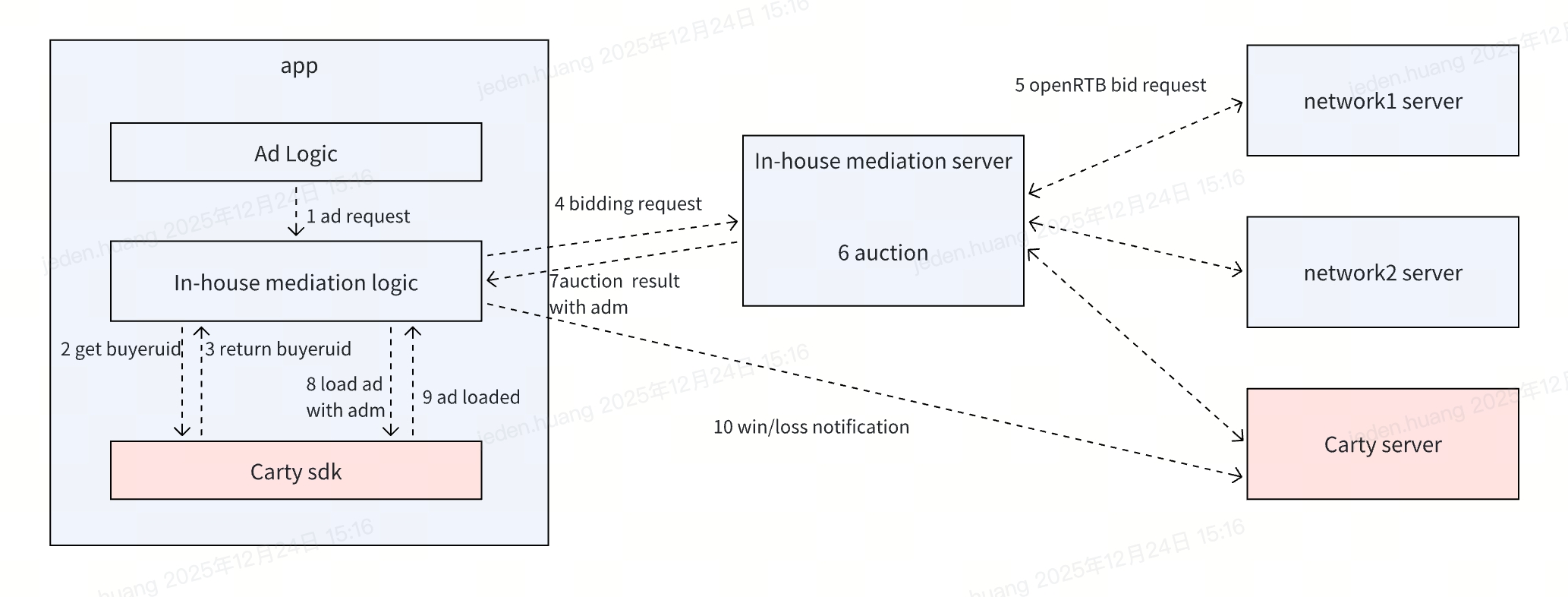
- Before an ad impression opportunity occurs, the In-house Client is required to invoke the Carty SDK to obtain a buyerUid, and then pass the buyerUid to the In-house Server.
- The In-house Server will subsequently send OpenRTB requests to the Carty Server in parallel. Upon receiving bid responses from Carty, the bids should be compared within the In-house Auction System, and the final result (adm) must be returned to the In-house Client.
- The In-house Client should then call the ad load API provided by the Carty SDK, passing the returned adm to load and render the ad. In addition, the integrator must properly handle Win/Loss/Billing notifications to ensure accurate auction outcome tracking and billing reconciliation.
SDK Integration Details
Before integrating the In-app Header Bidding logic, make sure you have read the Carty SDK's Android integration documentation (or iOS integration documentation) or have integrated Carty SDK into your project.
Email supply@carty.io for SDK integration instructions and download
Android
Initialization
It is recommended to call the SDK initialization method in the Application onCreate method. The SDK initialization method has no time-consuming operations and no special usage scenarios. It is recommended to call it in the main thread.
CTAdConfig adConfig = new CTAdConfig.Builder()
        .setAppId("YOUR_APP_ID")
        .setChannel("YOUR_APP_CHANNEL")
        .setDebug(BuildConfig.DEBUG)
        .build();
CTAdSdk.init(applicationContext, adConfig, new CTAdSdk.CTInitListener() {
    @Override
    public void onInitSuccess() {
    }

    @Override
    public void onInitFailed(CTAdError adError) {
    }
});
Obtain buyerUID
Obtain the buyerUID through the static method CTAdSdk.getBuyerUid() and inform your own server of this buyerUID for executing the server's bidding requests. It is recommended that you re-obtain the buyerUID before each bidding request.
Get the ads after server bidding
When constructing CTAdRequest , pass in admString .
CTAdRequest adRequest = new CTAdRequest.Builder()
        .setPlacementId("SPLASH_PLACEMENT_ID")
        .setAdmString("ADM_STRING")
        .build();
CTSplash ctSplash = new CTSplash(adRequest);
ctSplash.loadAd();
iOS
Initialization
Initialize The SDK as soon as your app starts.Call for the SDK initialization method in AppDelegate. When initializing, SDK will retrieve configuration information from the server. It is recommended to use the API in the main thread.
- (void)start:(NSString *)appid completion:(void (^)(void))completion;Sample Code:
- (BOOL)application:(UIApplication *)application didFinishLaunchingWithOptions:(NSDictionary *)launchOptions{
    [[CartyADSDK sharedInstance] start:@"abc123" completion:^{

    }];
}
Obtain buyerUID
Call for static method [CartyADSDK getBuyerUid] to obtain the unique buyerUID and transfer the buyerUID to your own server. This parameter will be used in the server-side bid requestsObject:User and it is recommended that you obtain the buyerUID each time you initialize your app or each time before you request for bids.
Load bid adm string
Pass adString into loadWithAdmString API.
Sample Code:
[interstitialAd loadWithAdmString:@"[ADM_STRING]"];Server-Side OpenRTB Bidding Integration
For developers who prefer a Server-to-Server (S2S) integration to bid directly with Carty, all requests must adhere to the OpenRTB 2.6 protocol.
Bid Request
Endpoint:https://xxx.com/xxx/bid
Header:
Content-Type: application/jsonx-openrtb-version: 2.6Content-Encoding: gzip(Highly recommended for reduced latency)
Request Object (Key Fields):
| Attribute | Type | Description |
|---|---|---|
id | string;required | Unique Request ID: Generated by the bidder/exchange to identify the transaction. |
imp.tagid | string;required | Carty Placement ID: The unique identifier for the ad unit, available in the Carty Publisher Dashboard. |
imp.bidfloor | float;optional | Floor Price: Minimum CPM for the impression. |
imp.bidfloorcur | float;optional | Currency: Currency code for the floor price (ISO 4217). Defaults to USD |
device.ip / device.ipv6 | string;required | IP Address: Public IPv4 or IPv6 address of the end-user device. |
user.buyeruid | string;required | Carty Buyer ID: The unique user identifier generated by the Carty SDK. This is mandatory for user matching. |
test | integer;required for test | Test Mode: 0 for Live traffic; 1 for Test/Sandbox mode. |
tmax | integer;required | Timeout: Max time (ms) to wait for a bid response, including network latency. Recommended: 2000. |
Bid Response
If Carty participates in the auction, a 200 OK response will be returned. The actual ad markup (creative) is contained within the seatbid.bid.adm field.
HTTP Status Codes:
- 200 OK: Bid returned successfully.
- 204 No Content: No bid available
Response Object (Key Fields):
| Attribute | Type | Description |
|---|---|---|
seatbid.bid.nurl | string | Win Notice URL: Called when the bid wins the auction. Must replace the macro ${AUCTION_MIN_TO_WIN} with the clearing price. |
seatbid.bid.lurl | string | Loss Notice URL: Called when the bid loses. Use macros ${AUCTION_PRICE} (First-price bid) and ${AUCTION_LOSS} (Loss reason code). |
seatbid.bid.burl | string | Billing Notice URL: Triggered upon successful impression rendering/billing. |
seatbid.bid.adm | string | Ad Markup: The raw ad string. This must be passed directly to the Carty SDK via the loadWithAdmString() method to render the ad. |
Implementation Notes for Developers
Macro Replacement: Ensure that your server-side logic correctly parses and replaces the OpenRTB macros (e.g.,
${AUCTION_PRICE}) before firing the notification URLs.SDK Handover: When using Header Bidding with Mediations, the
admstring retrieved via S2S must be injected into the local SDK to ensure proper tracking and rendering.Timeout Management: To maximize Fill Rate, ensure your server's
tmaxalignment matches the mediation partner's bidding timeout settings.
Integration Examples & Object Descriptions
To ensure successful integration, developers should pay close attention to the specific object requirements for each ad format. Below are the detailed JSON payloads for Banner, Video, and Native ads.
Banner Ad (Standard Display)
Banner requests are the most common and require fixed dimensions. The banner object must include the size supported by your app's UI (e.g., 320x50 for smartphones or 728x90 for tablets).
Bid Request Example:
{
  "id": "req_banner_001",
  "imp": [{
    "id": "1",
    "tagid": "carty_placement_banner_123",
    "bidfloor": 0.50,
    "bidfloorcur": "USD",
    "banner": {
      "w": 320,
      "h": 50,
      "pos": 1,
      "api": [3, 5],
      "mimes": ["text/html", "image/jpeg", "image/png"]
    }
  }],
  "device": { "ip": "192.168.1.1", "ua": "Mozilla/5.0..." },
  "user": { "buyeruid": "carty_user_token_abc" }
}
Bid Response Example:
{
  "id": "req_banner_001",
  "seatbid": [{
    "bid": [{
      "price": 0.75,
      "adm": "{\"type\":\"html\",\"content\":\"<html>...</html>\"}",
      "nurl": "https://ssp.carty.io/win?p=${AUCTION_MIN_TO_WIN}"
    }]
  }]
}
Video Ad (Interstitial / Rewarded)
Video requests follow the VAST (Video Ad Serving Template) protocol. These requests are more complex as they must define video technical specifications to ensure compatibility with the device's player.
Bid Request Example:
{
  "id": "req_video_002",
  "imp": [{
    "id": "1",
    "tagid": "carty_placement_video_456",
    "video": {
      "mimes": ["video/mp4", "video/webm"],
      "minduration": 5,
      "maxduration": 30,
      "protocols": [2, 3, 5, 6],
      "w": 320,
      "h": 480,
      "linearity": 1,
      "delivery": [1],
      "ext": { "rewarded": 1 }
    }
  }],
  "device": { "ip": "192.168.1.1", "ua": "Mozilla/5.0..." },
  "user": { "buyeruid": "carty_user_token_abc" }
}
Bid Response Example:
{
  "id": "req_video_002",
  "seatbid": [{
    "bid": [{
      "price": 12.50,
      "adm": "<?xml version=\"1.0\" encoding=\"UTF-8\"?><VAST>...</VAST>",
      "nurl": "https://ssp.carty.io/win?p=${AUCTION_MIN_TO_WIN}"
    }]
  }]
}
Native Ad (Structured Content)
Native ads provide the highest level of customization. Instead of a rendered image or HTML, the request specifies a list of Assets (Title, Icon, Main Image, Description) that the app will use to build a custom UI.
Bid Request Example:
{
  "id": "req_native_003",
  "imp": [{
    "id": "1",
    "tagid": "carty_placement_native_789",
    "native": {
      "request": "{\"native\":{\"ver\":\"1.2\",\"assets\":[{\"id\":1,\"required\":1,\"title\":{\"len\":80}},{\"id\":2,\"required\":1,\"img\":{\"type\":3,\"wmin\":1200,\"hmin\":627}},{\"id\":3,\"required\":0,\"data\":{\"type\":12,\"len\":15}}]}}",
      "ver": "1.2"
    }
  }],
  "device": { "ip": "192.168.1.1", "ua": "Mozilla/5.0..." },
  "user": { "buyeruid": "carty_user_token_abc" }
}
Bid Response Example:
{
  "id": "req_native_003",
  "seatbid": [{
    "bid": [{
      "price": 3.20,
      "adm": "{\"native\":{\"assets\":[{\"title\":{\"text\":\"Sample\"}},...]}}",
      "nurl": "https://ssp.carty.io/win?p=${AUCTION_MIN_TO_WIN}"
    }]
  }]
}